See the shape of an idea.
Enter a function, adjust the viewing window and use the graph to explore what changes. The calculator’s menus are there when you want to go further.
Try a graphYOUR BROWSER. YOUR MATH SPACE.
A little space for big ideas. Explore graphs, work through calculations, and pick up where you left off — right in your browser.
Free to useNo account neededNo installation
FROM QUESTION TO GRAPH
You don’t need to know every key.
Start with one function and take it from there.
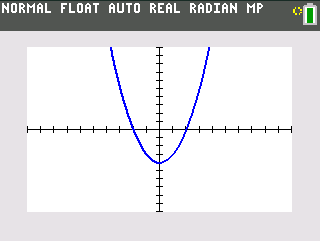
A parabola with a lowest point at (0, −4) and x-intercepts at −2 and 2.
Open calculatorOpen y=, select Y₁ and press clear. Enter X,T,θ,n x² – 4. Clear other Y= entries for this example.
Press zoom, then 6 for ZStandard. This sets the viewing window from −10 to 10 on both axes and draws the graph.
Use trace and the arrow keys to explore. The curve opens upward and crosses the x-axis on either side of the origin.
MORE THAN A QUICK CALCULATION
Enter a function, adjust the viewing window and use the graph to explore what changes. The calculator’s menus are there when you want to go further.
Try a graphImport compatible TI program files from your device. Check each program’s model requirements and dependencies before running it.
Explore math programsSave your calculator state locally and restore it on your next visit. Use the same browser and device, and keep your site data to retain your save.
Open your workspaceKEEP EXPLORING
Find a program for your next problem,
or take a quick puzzle break.
A FEW THINGS TO KNOW
How it works, what gets saved,
and what to expect.
Yes. You can open TIHub and use the calculator without an account or a software installation. Your browser downloads the calculator files the first time you open it.
Save session stores one calculator state in this browser on this device. Return to the same site and browser, then choose Restore session. It does not sync to the cloud or to other devices. Clearing your site data removes the saved session.
You can import supported TI program, group and variable files (.8xp, .8xg and .8xv). Compatibility depends on the file, calculator model and required libraries. Extract ZIP downloads before importing. A file extension alone does not guarantee that a program will run.
Use the on-screen keys in a current browser that supports WebAssembly. On a small screen, the keyboard stacks vertically and the save and import controls appear below it. Performance and browser storage availability can vary by device.
No. TIHub is an independent project and is not affiliated with, sponsored by or endorsed by Texas Instruments. TI-84 is a trademark of Texas Instruments.
YOUR NEXT IDEA STARTS HERE